WhatsApp Automation creates a system where software sends whatsapp automated messages, replies to customers, and manages conversations without human help. By 2026, this technology has moved beyond simple “if this, then that” rules. It now uses Generative AI* to understand complex questions, provide instant support, and drive sales 24/7. This shift allows businesses to lower costs while keeping customers happy with instant replies.
The Evolution of Conversational Commerce in 2026: The Role of WhatsApp Automated Messages
The way businesses talk to customers has changed forever. In the past, companies relied on slow email chains or phone calls. Now, messaging is instant. In 2026, Conversational Commerce is the standard. Powered by whatsapp automated messages, customers expect to browse, ask questions, and buy products directly inside WhatsApp.
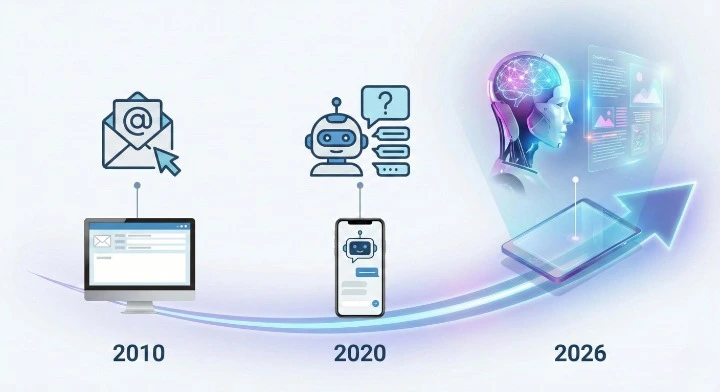
The Shift from Rule-Based Chatbots to Generative AI Agents
Old chatbots were frustrating. If you typed a phrase they did not know, they got stuck. They followed strict rules. Today, we use Generative AI Agents. These intelligent bots understand context. They can handle spelling mistakes, understand slang, and give helpful answers that feel like a real person wrote them. This change helps businesses solve problems faster.
Why 2026 is the Year of Regulatory Compliance and ROI
Two big things matter this year: following the law and making money. Governments have new rules about AI transparency. You must tell customers when they are talking to a bot. At the same time, businesses are focused on Return on Investment (ROI). Automation is no longer just a cool toy. It is a necessary tool to save money on support staff and increase sales revenue through whatsapp automated messages.
What is WhatsApp Automation?
WhatsApp Automation is the use of API technology or apps to automatically send and receive messages on WhatsApp. It acts as a digital worker that never sleeps. It handles repetitive tasks like answering FAQs, sending order updates, and reminding customers about items left in their cart using whatsapp automated messages. This allows human staff to focus on complex issues that need empathy.
The Core Components of WhatsApp Automated Messages
To build a good system, you need three main parts. First, you need the WhatsApp Business API or App to connect to the network. Second, you need a CRM (Customer Relationship Management) tool to store customer data. Third, you need a Workflow Builder to tell the system what to do. When these parts work together, messages flow smoothly without manual typing.
How It Works (Trigger -> Condition -> Action)
Automation follows a simple logic path.
- Trigger: This is the event that starts the process. For example, a customer sends a message saying “Hello.”
- Condition: The system checks a rule. Is it business hours? Is this a new customer?
- Action: The system performs a task. It sends a “Welcome” message or opens a support ticket.
Manual Messaging vs. Automated Systems Efficiency
Here is why businesses switch to automation in 2026.
| Feature | Manual Messaging (Human) | Automated System (AI Agent) |
| Response Time | 10 minutes to 24 hours | Instant (Under 1 second) |
| Availability | 8-10 hours a day (Business hours) | 24 hours a day, 365 days a year |
| Cost Per Interaction | High (Staff salary) | Low (Software cost) |
| Error Rate | Medium (Fatigue, typo) | Near Zero (Consistent data) |
| Scalability | Hard (Must hire more people) | Easy (Unlimited conversations) |
Critical 2026 Ecosystem Updates
Meta (the owner of WhatsApp) changes the rules often. In 2026, the ecosystem is different than it was a few years ago. Businesses must stay updated to avoid extra costs and account bans for whatsapp automated messages. The focus is now heavily on quality conversations rather than just bulk messaging.
Meta’s New Per-Template Pricing Model Explained
In the past, pricing was simpler. Now, Meta charges differently based on what kind of message you send.
- Utility: Messages like receipts or shipping updates cost less.
- Marketing: Promotions and offers cost more.
- Authentication: Sending OTP codes has its own specific rate.
- Service: When a user messages you first, the reply window is often free or low-cost for 24 hours.
You must categorize your message templates correctly to manage your budget.
2026 AI Compliance: WhatsApp Automated Messages and Open-Ended Bot Restrictions
New laws require you to be honest. If an AI is talking, you must label it. Also, “Open-ended” bots that can say anything are being restricted in some regions to prevent wrong information. You must set “guardrails” for your AI. This ensures the bot does not promise discounts you don’t offer or give bad advice.
Leveraging the WhatsApp Business Calling API
A huge update for 2026 is the Calling API. Previously, automation was solely dependent on whatsapp automated messages. Now, businesses can automate voice interactions. If a customer is stuck in a text chat, the bot can trigger a call to a human agent or an AI voice assistant directly within WhatsApp. This bridges the gap between chat and phone support.
WhatsApp Business App vs. WhatsApp API
Choosing the right platform is the first step to success. There are two main versions of WhatsApp for business. The free app is for very small teams. The API is for growing businesses that need advanced features. For a deeper look at the differences, you can read our WhatsApp Business App vs API: Feature Comparison guide.
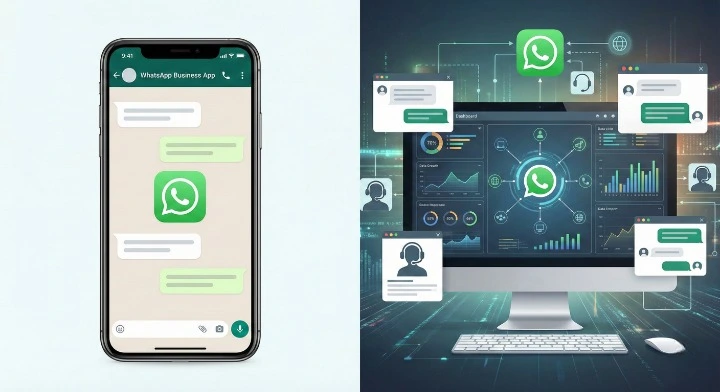
Limitations, Costs, and Capabilities
| Feature | WhatsApp Business App | WhatsApp Business API |
| User Limit | 1 phone + 4 linked devices | Unlimited users/agents |
| Broadcast Limit | 256 contacts per list | Unlimited (Tier-based) |
| Automation | Basic (Away/Greeting messages) | Advanced (Chatbots, AI, Integrations) |
| Green Tick | Hard to get | Easier to verify |
| Cost | Free | Paid (Per conversation + Software) |
Maximizing Free WhatsApp Automation Tools
If you are a solo entrepreneur or a local shop, start with the free app for whatsapp automated messages. You can set up “Quick Replies” to answer common questions with one tap. You can also use “Labels” to track orders. While limited, these tools help organize your chats without spending money on software.
Scaling with API Integrations and Flow Builders
Large companies process thousands of messages daily. They cannot use a single phone. They connect the WhatsApp API to a central dashboard. This allows multiple support agents to work on one number. It also connects to external databases to pull up customer order history instantly.
Essential Automated Workflows and WhatsApp Automated Messages for Customer Support
Customer support is the backbone of trust. Automation ensures no customer feels ignored. By handling simple tasks using whatsapp automated messages, your human agents can focus on solving real problems. For a complete guide on setting this up, check out our resource on 24/7 WhatsApp Chatbot Support: Setup Guide & Key Benefits.
Setting Up 24/7 Instant Response Protocols (Greeting & Away Messages)
The most basic automation for whatsapp automated messages is the Greeting Message. When a customer messages you, they should get an instant reply.
- Greeting: “Hi! Thanks for contacting us. How can we help you today?”
- Away Message: “We are currently closed. Our hours are 9-5. We will reply first thing in the morning.”
This manages expectations so customers do not get frustrated waiting.
Building Interactive FAQ Menus
Most questions are repetitive. “Where is my order?” or “What is your refund policy?” You can build a menu with buttons.
- Check Order Status
- Refund Policy
- Talk to Agent.
When a user clicks a button, the bot gives the answer instantly. This “deflects” tickets away from human staff, reducing their workload by up to 40%.
Automating Satisfaction Surveys (CSAT)
How do you know if your support is good? Ask the customer. Once a conversation is marked “Resolved,” the system automatically sends a message: “How would you rate our help today from 1 to 5?” This data helps you train your team and improve your service.
High-Impact WhatsApp Automated Messages & Flows for Sales & Marketing
WhatsApp has a 98% open rate. This makes it perfect for sales. However, you must be careful not to spam. The goal is to send timely, relevant messages that help the user buy. For inspiration on what to send, look at our list of Whatsapp Automation 50 Use Cases.
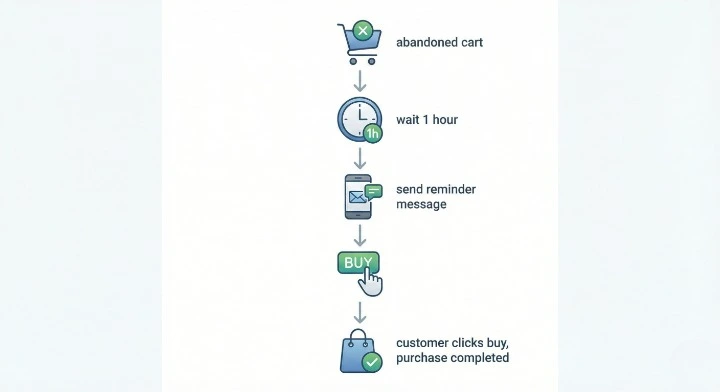
Recovering Lost Revenue with Abandoned Cart Reminders
Many people add items to their cart and then leave. An automated WhatsApp message can bring them back. Trigger the message 1 hour after they leave the site.
Message: “Hi [Name], you left something great in your cart! Do you want to complete your order?”
Including a photo of the product increases the chance of them buying it.
Structuring Effective WhatsApp Drip Campaigns for Lead Nurturing
A “Drip Campaign” is a series of messages sent over time. It warms up a lead.
- Day 1: Welcome and Brand Story.
- Day 3: Educational tip related to the product.
- Day 7: A special discount offer.
This keeps your brand in their mind without being annoying. To learn the best timing and content strategies, read our WhatsApp Drip Campaigns: Setup, Strategy & Success Guide.
Automating the Intake Process
Don’t waste sales time on bad leads. Use a bot to ask qualifying questions first.
- “What is your budget?”
- “When are you looking to buy?”
- “What industry are you in?”
Based on the answers, the bot can tag the lead as “Hot” or “Cold” and assign it to the right salesperson.
Integrations and Software
To make automation work, WhatsApp must talk to your other software. If WhatsApp is an island, managing whatsapp automated messages is not efficient. Integration allows data to move back and forth automatically. You can explore the landscape of tools in our article on Whatsapp Business Api Integrations 2026 Automation.
Connecting CRM and E-commerce Platforms (Shopify, WooCommerce, HubSpot)
Your customer data lives in your CRM (like HubSpot) or your store (like Shopify). Connecting these to WhatsApp allows powerful triggers.
- Shopify: When an order ships, WhatsApp sends the tracking number automatically.
- HubSpot: When a deal stage changes in the CRM, the client gets a WhatsApp update.
This seamless connection removes manual data entry errors.
Best WhatsApp Automation Software & Tools for WhatsApp Automated Messages in 2026
There are many tools available. In 2026, the best tools offer visual flow builders and AI capabilities.
- Waplify: Best for WhatsApp broadcasts and chatbots. Easy for Indian businesses. One-time pay options.
- WATI: Great for small to medium businesses. Easy interface.
- Interakt: Focused on e-commerce catalogues.
- Twilio: For developers who want to build custom code solutions.
- ManyChat: Famous for marketing flows and ease of use.
A 30-Day Execution Roadmap
Don’t try to do everything at once. Follow this plan to launch successfully.
Days 1-7: Verification, Compliance, and Contact List Import
- Day 1: Apply for the WhatsApp Business API.
- Day 3: Verify your Facebook Business Manager ID.
- Day 5: Clean your contact list. Remove invalid numbers.
- Day 7: Get consent. ensure you have permission to message your contacts (Opt-in).
Days 8-14: Deploying ‘Quick Win’ Automations (Greetings & FAQs)
- Day 8: Set up your “Welcome” message.
- Day 10: Create an Away message with your office hours.
- Day 12: Build a simple FAQ menu (3-5 buttons).
- Day 14: Test these flows internally with your team.
Days 15-30: Advanced API Integrations and AI Training
- Day 15: Connect your CRM or E-commerce store.
- Day 20: Set up the Abandoned Cart trigger.
- Day 25: Train your AI agent on your specific product knowledge base.
- Day 30: Launch to a small segment of your customers and monitor results.
The ‘Human-First’ Approach
Automation is great, but humans are better at empathy. Over-automating can make your brand feel robotic and cold.
Designing Seamless Human Handover Protocols
Always offer an escape hatch. If the bot cannot answer, or if the customer is angry, the system must hand over the chat to a human immediately. The human agent should see the full chat history, so the customer does not have to repeat themselves.
Avoiding Spam Penalties and Block Rates
If too many people block you, WhatsApp will lower your “Quality Rating.” If this gets too low, you lose access to the API.
- Don’t: Send messages every day.
- Don’t: Send irrelevant offers.
- Do: Make it easy to Unsubscribe (Opt-out).
Future-Proofing Your Communication Strategy
In 2026, WhatsApp Automation is the key to scaling customer support and sales. By moving from manual typing to AI-driven workflows for whatsapp automated messages, you save time and boost revenue. The technology will keep changing, but the need for fast, helpful communication will stay the same.
Summary of Key Takeaways
- Move to AI: Use Generative AI agents, not just rigid buttons.
- Use the API: For scale and advanced features, the API is essential.
- Integrate: Connect WhatsApp to your CRM and Store.
- Stay Compliant: Follow the new 2026 rules on AI transparency.
Final Checklist for Launching Your First Flow
- [ ] Verified Business Manager Account.
- [ ] Selected a WhatsApp Software Provider (BSP).
- [ ] Mapped out the conversation flow on paper.
- [ ] Written clear, friendly copy for messages.
- [ ] Tested the “Human Handover” button.
- [ ] Launch!